Minesweeper
Play Minesweeper online for free, right here in your browser. No download, no sign-up and no guessing: every board can be cleared with logic alone.
How to play Minesweeper
The goal is simple. Open every square that doesn't hide a mine.
Click any square to begin. Your first click is always safe and always opens up a patch of the board.
The numbers are your clues. Each one tells you how many mines touch that square, diagonals included. A 1 means exactly one mine is hiding next to it. A 3 means three.
Know where a mine is? Right-click the square to plant a flag. Right-click again to take it away.
Open all the safe squares and you win. Hit a mine and it's game over.
Never played before? Our guide on how to play Minesweeper walks you through your first game, step by step.
Controls
| Left click | Open a square |
|---|---|
| Right click | Plant or remove a flag |
| Click a number | Open all squares around it once it has the right number of flags. The classic way works too: press both mouse buttons, or use the middle button. |
| Space | Flag the square under your mouse, or open around a number |
| F2 or N | New game |
| H | Show a hint |
| Arrow keys and Enter | Play without a mouse. Click the board or tab to it first. |
On a phone or tablet
Tap a square to open it. Hold your finger on a square to plant a flag. Prefer tapping to flag? Switch the Dig button in the top bar to Flag.
Full screen and bigger squares
Want more room on a computer? Press the full screen button in the top bar. The round button next to the sound icon lets you pick bigger or smaller squares, and a different table color while you're at it.
Pick your level
| Level | Board | Mines |
|---|---|---|
| Beginner | 9 × 9 | 10 |
| Intermediate | 16 × 16 | 40 |
| Expert | 30 × 16 | 99 |
These are the classic sizes, the same ones Minesweeper has used for decades.
Beginner is perfect for learning. Intermediate is where the real puzzling starts. Expert is a real test of nerve.
Used to the game in Google Search? We have its board sizes too. Play Google Minesweeper on Easy, Medium or Hard.
No guessing needed
Ever been stuck at the very end with a 50-50 guess? Not here.
Before you play, every board is checked by a solver. It can always be cleared with logic alone, from your first click to the last square.
So if you're stuck, look again. There's always a safe move hiding in the numbers. Read more about no-guess Minesweeper and why the classic game sometimes makes you guess.
Learn with hints
Can't find it? Press Hint. It shows you the next move and tells you why it works, so you'll spot the pattern yourself next time.
A gold ring marks the number that gives it away. Green squares are safe to open and red squares are mines to flag. A dashed edge shows where a number's mine must be hiding.
The explanation stays on screen until your next move, so take your time. Don't need it? Click or tap anywhere else to close it.
Tips and patterns
A few tricks the fast players use.
Start with the easy ones
A 1 with only one closed square next to it? That square is a mine. Flag it and move on.
Count the flags
When a number already touches as many flags as it shows, all its other neighbors are safe. Click the number to open them in one go.
Learn the 1-2-1
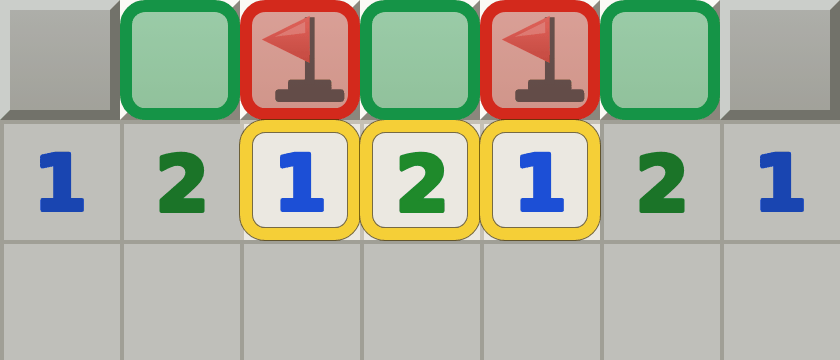
Shapes like this come back in almost every game. Learn a handful of them and you'll play a lot faster. Here are all the Minesweeper patterns, with pictures.
Keep an eye on the counter
The red counter on the left shows how many mines are still unflagged. Once you've found every mine, any square without a flag is safe, even one tucked away between mines.
Work the edges
Squares along the walls and in the corners have fewer neighbors. The numbers there tell you more, so they're often the best place to start.
Take your time near the end
Speed comes with practice. A careless click on the last few squares costs far more than a few extra seconds.
Statistics and best times
Your results are saved in this browser for each level: games played, win rate, best time, average time and your winning streaks.
A game counts as soon as you open the first square. Starting over or leaving halfway counts as a loss, just like in the classic game.
Used a hint? Then your win still counts, but the time can't become a best time. Fair is fair.
Wondering how your times compare? The Minesweeper world records are humbling. Expert has been cleared in under 27 seconds.
A bit of history
Minesweeper is older than most people think. Microsoft first released it in 1990, in a pack of extra games for Windows. Two years later it came free with Windows 3.1, and the whole world started flagging mines.
This version keeps the look you remember: the gray squares, the red counters and of course the smiley. Want the full story? Read the history of Minesweeper.
Questions and answers
Is the first click always safe?
Yes. The mines are placed after your first click, never on that square and never right next to it. So you always start with an opening.
What does the smiley do?
Click it to start a new game. It also keeps an eye on you: it gasps while you press a square and puts on sunglasses when you win. And when you hit a mine? You'll see.
Why does the mine counter go below zero?
The counter shows the number of mines minus the flags you've planted. Below zero means you've planted more flags than there are mines, so at least one of them is wrong.
Can I play on my phone?
Yes. Tap to open a square and hold to plant a flag. On a small screen the bigger boards scroll, so Beginner is the most comfortable.
Do I need to download anything?
No. Minesweeper runs right here in your browser, on any computer, tablet or phone.
Are my best times saved?
Yes, in this browser on this device. Clearing your browser data wipes them, and they don't move to other devices.
Is it Minesweeper or Mine Sweeper?
You'll see both, but the original Windows game was called Minesweeper, written as one word. Whatever you call it, you're in the right place.
Is this the same game as Google Minesweeper?
No, this is our own version and it has nothing to do with Google. The rules are the same, though. You can even play Google's three board sizes on our Google Minesweeper page.